

Your Car Is Talking. Are You Listening? Understanding and Using OBD-II Data for Smarter Maintenance
That little port under your dashboard? It’s not just for mechanics. It’s your car’s direct line of communication—a digital confessional where it shares its secrets, its worries, and its vital stats. This is the OBD-II port, and the data flowing from it is a goldmine for anyone who wants to move from reactive “oh no” maintenance to proactive “aha!” care. Let’s dive in.
OBD-II: Your Car’s Universal Translator
First, a quick backstory. Since 1996, every car sold in the US has been required to have an On-Board Diagnostics II (OBD-II) system. Think of it as a standardized health monitor. When a sensor detects something off—a misfire, a lazy oxygen sensor, an evaporative leak—it triggers a Diagnostic Trouble Code (DTC). That’s your infamous “check engine” light. But here’s the deal: that light is just the headline. The real story is in the live data stream.
What Kind of Data Are We Talking About?
Honestly, it’s a firehose of information. A basic OBD-II scanner can read dozens of Parameter IDs (PIDs). These aren’t just codes; they’re real-time readings. We’re talking:
- Engine Load & RPM: How hard your engine is working at any given moment.
- Coolant & Intake Air Temp: Critical for spotting overheating or inefficient combustion.
- Fuel Trim (Short & Long Term): This is a big one. It shows how much the computer is adjusting the fuel mixture to keep things perfect. Deviations here are early warning signs.
- O2 Sensor Voltages: The guardians of your exhaust, constantly reporting on combustion efficiency.
- Vehicle Speed & Timing Advance: The basic rhythms of your drive.
And that’s just the generic stuff. More advanced tools can access manufacturer-specific data—everything from transmission fluid temp to individual cylinder misfire counts.
Transforming Data into Actionable Maintenance
Okay, so you’ve got numbers. Now what? The magic happens when you watch these values over time and under different conditions. You stop guessing and start knowing.
The Art of the “Freeze Frame”
When a check engine light pops on, the OBD-II system saves a “freeze frame.” It’s a snapshot of all the key data at the exact moment the fault occurred. Was the engine cold or hot? Were you idling or accelerating? This context is priceless. It turns a generic “P0300 – Random Misfire” code into a specific clue: “Misfire occurred at 72°F coolant temp, 25% engine load, while idling.” That points you toward a very different set of fixes than a misfire at full throttle.
Catching Problems Before They’re “Problems”
This is the real power. Let’s say you monitor your long-term fuel trim. It should hover around 0% (±5%). If you notice it steadily creeping to +10% over a few weeks, the engine is constantly adding fuel to compensate. That’s a whisper of a future problem—maybe a dirty mass airflow sensor or a weak fuel pump. You can address it now, before it triggers a light or hurts your fuel economy.
Or take oxygen sensor activity. A healthy O2 sensor waveform looks like a rapid, clean heartbeat. A lazy, slow waveform? That sensor is getting tired, and it’s starting to lie to your engine computer, hurting performance and emissions. You see it dying in slow motion.
A Practical Guide to Getting Started
Convinced? Here’s how to tap into this stream. You’ll need two things: a hardware reader and software to interpret the data.
| Tool Type | What It Is | Best For |
| Basic Code Reader | Reads/clears DTCs. Cheap, simple. | Just seeing what triggered the check engine light. Limited value for proactive care. |
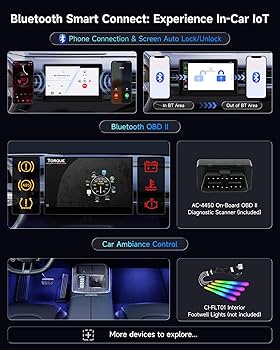
| Bluetooth/Wi-Fi OBD-II Adapter | A small dongle that plugs into the port and pairs with your smartphone. | Enthusiasts & DIYers. Apps turn your phone into a powerful live data dash. This is the sweet spot. |
| Professional Scan Tool | Expensive, standalone units with bi-directional controls. | Advanced diagnostics and actuating tests. Overkill for most owners. |
For most people, a $20-$50 Bluetooth adapter and a robust app like Torque Pro (Android) or ScanTool (iOS) is a revelation. You get live gauges, logging, and the ability to see trends. It’s like giving your car a fitness tracker.
Beyond the Engine: The Bigger Picture
Utilizing automotive data from OBD-II ports isn’t just about fixing things. It’s about understanding your vehicle’s unique personality. You’ll learn what “normal” looks like for your car. That knowledge is empowering.
You can also use the data to:
- Verify Repair Work: Did that new O2 sensor actually fix the fuel trim? The data doesn’t lie.
- Improve Driving Habits: Watching real-time fuel economy feedback can subtly change how you drive—for the better.
- Provide Concrete Evidence: Going to a mechanic with a log of a intermittent problem is infinitely better than saying, “It makes a funny noise sometimes.”
A Word of Caution (Because We’re Being Real)
This data is a guide, not an oracle. It tells you the “what,” not always the “why.” A code for a lean condition could be a vacuum leak, a bad sensor, or a dozen other things. Don’t immediately throw parts at the car based on a single data point. Use it as a map to start your investigation. And sure, sometimes you’ll still need a pro with experience and a lift. That’s okay.
The goal isn’t to replace your mechanic. It’s to become a more informed partner in your vehicle’s health. To have a conversation, rather than just receive a verdict.
So, plug in. Start listening. Your car has been trying to tell you things for years. With a little effort, you can finally understand the language. And that shift—from passive owner to active custodian—might just be the most satisfying maintenance step of all.